Exacta Maestro™ customer Technical Requirements
Table of Contents
- Table of Contents
- Introduction
- Network Diagram
- Workstation Hardware
- Exacta Maestro™ Virtual Machines
- High Availability
- Network Metric Requirements
- Remote Access
Introduction
This document is meant to be a technical reference guide for all technical requirements for an Exacta Maestro™ installation.
Network Diagram
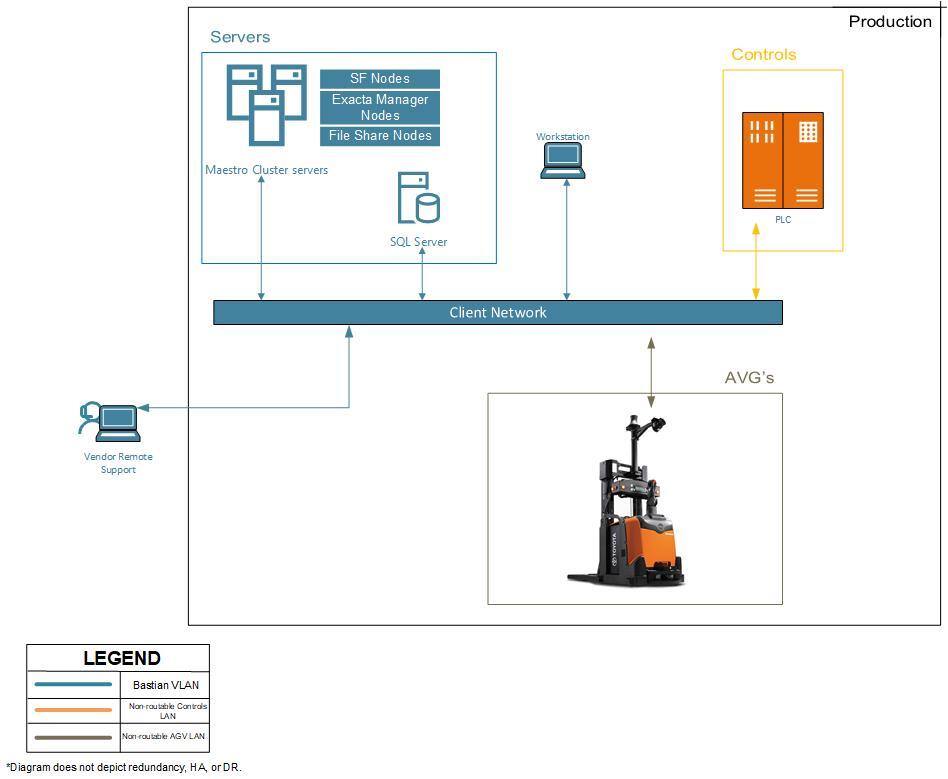
Workstation Hardware
Purpose - allows an operator to view a portal to interact with the Exacta Maestro™ Fleet director service. Computer type - Workstation Tower *System spec requirements
- Processor: Intel i5 or better (4 core CPU minimum)
- RAM: 16GB or better
- Hardrive: 256GB Flash or better
- Partition: C:\system 200GB | L:\Logs 56GB
- Network: 1GB port or better (added NIC card optional)
- OS: Windows 10 Pro or better
- GPU: Nvidia Quadro card (recommended for Unity scene rendering)
Hardware setup will be the responsibility of the customer, this includes installation of operating system as well as antivirus, monitoring tools, and backup software.
System updates will be the responsibility of the customer, this includes and is not limited to, all Windows patching, anti virus updates, Etc.
Exacta Maestro™ Virtual Machines
Manager Node
Purpose - Used for management, deployment, and peripheral applications outside of the service fabric cluster.
- System spec requirements
- Processor: 4 CPU cores
- RAM: 32GB
- Disk Partition: C:\System 500GB | D:\Data 500GB
- Network: 1GB
Application and Windows Features
| Required | Installation/configured by |
|---|---|
| Windows Server 2019 | customer |
| SQL Server | customer |
| SQL Server Management Studio (SSMS) | customer |
| Service Fabric SDK | customer |
| Exacta Maestro™ | Bastian Solutions |
| .NET Framework 4.8 or greater FULL Install | customer |
| Windows File Share (domain joined system only) | customer |
| Notepad++ | customer |
| Windows Powershell 5.1 | customer |
Updates
customer is responsible for all Windows patches in this environment. Regular updates can be applied, or updates can be disabled, this is to be decided by customer. Bastian Solutions will provide and install any patches for the Service Fabric Runtime, Certificates & other software installed by Bastian solutions as needed.
Maintenance
Bastian Solutions requires remote access to perform Service Fabric runtime upgrades and certificate roll overs. Runtime upgrades should be able to roll through updates during production hours or customer must provide a maintenance window for Bastian Solutions prior to any certificate expirations.
Backup and recovery
The Exacta Maestro™ Application server is a static environment. Recommend nightly backups of the logs database(s). The backup and recovery process will be the responsibility of customer.
Network Ports
| Service/Application | Port Value | TCP/UDP |
|---|---|---|
| Powershell Remoting | 5986 | TCP |
| Windows SMB & Remote | 135,137-139,445 | TCP |
| SF Remoting Application | 1900-19003, 19080 | TCP |
| Application communication | 20001-21024, 4915 | TCP |
| TDA Proxy Server Host | 5672 | TCP |
Cluster Nodes
Purpose - Designates the route for the product as it travels through the conveyor system.
- System spec requirements
- Processor: 4 CPU cores
- RAM: 32GB
- Disk Partition: C:\System 500GB | D:\Data 500GB
- Network: 1GB
Application and Windows Features
| Required | Installation/configured by |
|---|---|
| Windows Server 2019 | customer |
| Service Fabric SDK | customer |
| .NET Framework 4.8 or greater FULL Install | customer |
| Notepad++ | customer |
| Windows Powershell 5.1 | customer |
Updates
customer is responsible for all Windows patches in this environment. Regular updates can be applied, or updates can be disabled, this is to be decided by customer. Bastian Solutions will provide and install any patches for the Service Fabric Runtime, Certificates & other software installed by Bastian solutions as needed. Recommended to roll the updates and restarts of the nodes so not to crash the cluster.
Maintenance
Bastian Solutions requires remote access to perform Service Fabric runtime upgrades and certificate roll overs. Runtime upgrades should be able to roll through updates during production hours or customer must provide a maintenance window for Bastian Solutions prior to any certificate expirations.
Network Ports
| Service/Application | Port Value | TCP/UDP |
|---|---|---|
| Powershell Remoting | 5986 | TCP |
| Windows SMB & Remote | 135,137-139,445 | TCP |
| SF Remoting Application | 1900-19003, 19080 | TCP |
| Application communication | 20001-21024, 4915 | TCP |
| TDA Proxy Server Host | 5672 | TCP |
High Availability
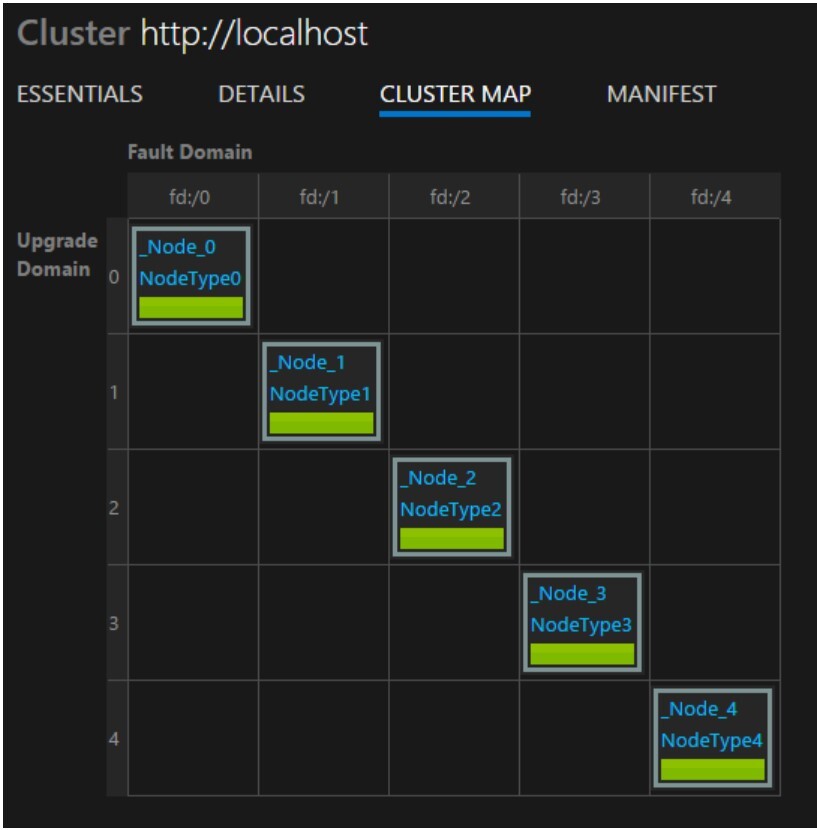
Bastian and the customer will work together to define a cluster design.
Description
Service Fabric is a distributed systems platform that is a container orchestrator for deploying and managing microservices across a cluster.
Network Metric Requirements
| Metric | Measure |
|---|---|
| Connection speed between server | Minimum 10Gb connection speed between Servers and Storage arrays (Where setup is applicable) |
| Connection speed | Minimum 1Gb connection speed between other devices (i.e. workstations/bots to servers) |
| Latency | Below 30ms between any critical system components (such as Bots, Workstation, Cluster nodes, etc.) |
| Utilization | Recommended less than 40% average |
| Collision Rate | Recommended less than 5% |
| Average Broadcast Frame Rate | Recommended less than 5% |
| vLAN Implementation | Recommended to isolate network traffic; Hard-wire LAN connectivity where applicable is recommended |
Remote Access
Virtual Private Network (VPN)
As part of the warranty support period, and any continued support agreement, customer must provide Bastian Solutions remote connectivity to the network. The remote connection will initially be used for interface testing and remote configuration of the cluster. After go-live, the connection will be used to monitor the system, troubleshoot problems and perform upgrades/maintenance. customer will provide Bastian Solutions and any other vendors that require remote access.
If Citrix or VMWare Horizon is used, customer will provide Bastian Solutions users admin access to shadow, take control and share clipboard visibility to access the thin clients remotely via CITRIX. Bastian Solutions requires powershell remote access directly to the nodes.
Once securely connected to the network, Bastian Solutions will typically use Remote Desktop Connection and Powershell Sessions to connect to the server systems. Bastian Solutions requests User IDs for:
- Bastian Solutions Software Project Manager(s)
- Bastian Solutions Software Support Manager(s)
- Bastian Solutions Software IT Analyst(s)
- Bastian Solutions Developer(s)